If you’re planning to buy a Mac mini to run local AI, choosing how much memory to get is probably the hardest part. With video models in particular, the download alone is over a hundred GB, so it’s easy to think the machine needs a hundred GB of memory as well.
I ran a round of MiniMax-H3 tests on my M5 Pro with 64GB at home. In the short-clip tests, memory peaks were mostly in the 18.5–22GB range; the 9-second run reached 25.6GB. With the recommended parameters, generating a vertical video of about 2 seconds takes about 3 minutes.
So this round of short-clip tests doesn’t use all 64GB. But you shouldn’t choose a configuration based only on the 22GB figure either; you also have to account for the system, other software, and the memory available to the GPU. Below I list the results from my actual runs, as a reference for anyone who hasn’t bought a machine yet.
I used h3.c, written by antirez, the author of Redis. It’s pure C + Metal. It supports text-to-video, first/last frame, and reference images, and can generate audio alongside the video.
First, here are two generated samples:
(Blog version: the videos above have been replaced with the original videos with audio; the WeChat Official Account version uses silent GIFs.) The clerk in that clip said “Welcome” correctly, but it doesn’t always go this smoothly — I’ll get to that below.
Memory: you won’t use all 64GB, but you can’t just buy a smaller-memory machine either
Mac mini, M5 Pro, 20-core GPU, 64GB memory, 2TB drive. It also runs other services as usual; I didn’t stop them during testing. You may also be wondering: if you’re only running this model, do you need to buy 64GB?
Here are the records:
| Test | Recorded memory peak |
|---|---|
| ~2-second short clip, various acceleration parameters | 18.5–22GB |
| 9-second vertical video | 25.6GB |
These are peaks recorded during generation, not the total usage of the whole machine including the system and other services. These tests didn’t hit swap; 64GB really does leave a fair amount of headroom. Before starting the service, headroom is around 93%; while the service is running, headroom can still stay around 60%.
The downloaded model size and the memory it uses at runtime are not the same number. h3.c loads different parts in stages; the path my M5 uses also converts to int8 at load time. 134GiB of weights sitting on disk doesn’t mean 134GiB of memory is used all at once.
But there’s another number to look at: the program identifies this machine’s recommended GPU working set as 51.8GiB. That’s the amount of memory Metal suggests the GPU should use at once; it doesn’t mean the model is already occupying 51.8GiB, nor does exceeding it mean it definitely can’t run. Macs use unified memory, but you can’t treat the 64GB on the box as space the GPU can freely fill up.
That’s also why I didn’t simply write “24GB is enough.” Short clip peaks are already at 18.5–22GB, and the 9-second run reached 25.6GB; the system and background programs aren’t counted yet. If you switch to a smaller-memory machine, you’d need to re-test whether this same set of parameters still has headroom.
If I were choosing memory for this use case now, I’d think about it like this:
| Memory configuration | How to think about it based on this test | Actually tested |
|---|---|---|
| 24GB | Short clip peaks are already close to the machine’s total memory, and the 9-second run exceeds it; you can’t just reuse this set of parameters, you’d need to test a memory-saving approach | No |
| 48GB | More headroom than these peaks; worth considering if you mainly do short shots and don’t run many programs at once | No, inferred from this machine’s records |
| 64GB | I also keep other services running; these tests didn’t hit swap, and it’s fairly hassle-free | Yes, this is the machine in this article |
The original report’s estimate for 48GB assumes the GPU working set is about 80% of memory, roughly 38GB. That ratio is only an estimate and can’t be treated as a fixed quota for every machine; if you buy a different configuration, you still have to look at the number the program actually reports. I also haven’t run this on 48GB, so what I’m saying here is “worth considering,” not a guarantee that it’s as fast as 64GB.
There’s another path for small memory, but it trades time for space. h3.c’s --ssd-streaming reads later parts of the main model from the SSD while computing. The author recorded the main model tensor storage on an M5 Max dropping to about 2.0–2.1GiB; note this isn’t the whole program using only 2GB — text encoding, video decoding, the system and other buffers still need memory.
In the author’s tests, one round of main model computation was 26% and 84% slower, respectively, for the two aspect ratios, using the same BF16 path. That can’t be directly converted into “how many minutes a 24GB Mac mini would wait in total,” nor can it be applied to my int8 tests here. I didn’t test streaming this time, so I won’t give that answer yet.
So the value of 64GB is headroom; you can’t call it a must based on these few short clips alone. If I were mainly running H3 short clips, I’d consider 48GB first; if I also wanted to run other models and services at the same time, I’d rather go with 64GB. For 24GB, you’d first have to test a memory-saving approach before deciding whether its speed is acceptable.
What about the M6 Mac mini everyone’s discussing now? Apple’s published configurations top out at 32GB unified memory; you can’t choose the 48GB or 64GB mentioned above. Compared with this test’s 18.5–22GB short clip peaks, 32GB looks worth trying; but the 9-second run already hits 25.6GB, and you still need to leave space for the system and other programs, so you can’t conclude it will definitely run just because “32 is bigger than 25.6.” If you have an M6, feel free to leave your test results in the comments.
There’s also software compatibility. As of this update, h3.c’s public documentation still focuses mainly on optimizing for M3 Max and M5 Max, and doesn’t list M6-specific optimizations or measured results. I’m also using the M5 acceleration path here; you can’t directly apply this machine’s roughly three-minute result just because M6 is newer.
So if I were buying an M6 mainly for H3, I’d first wait for its support status and measured results on the same configuration; if I also needed to do other things and H3 was just for occasional fun, I’d keep it on the candidate list. I don’t have an M6, so for now I won’t make up an estimated time for it.
Once memory is enough, the next question is whether you can live with it day to day: how long does generating a video take?
Generation speed: fine for short shots, long clips mean a wait
All of the following are actual records from this machine, portrait 576×1024, recommended quality:
| Requested duration | Total time |
|---|---|
| 2 seconds | 2 min 40 s |
| 3 seconds | 3 min 35 s |
| 5 seconds | 7 min 24 s |
| 9 seconds | 17 min 20 s |
The program rounds the frame count up, so the actual video is slightly longer than requested. The time is measured from when the run starts to when the output file is written, including model loading, generation, and decoding.
The 2- and 3-second clips are acceptable—enough for a short shot. Beyond that, the wait gets long. I initially estimated from two data points that 9 seconds would take about 12 minutes; it ended up taking 17. I didn’t test 15 seconds, and I don’t usually need clips that long.
The h3.c version used in this article is 8974cc0; testing was from late September to early October.
Recommended mode and draft mode
With the same image, same prompt and seed, I tested several acceleration methods. For a 2.33-second portrait video:
- Default parameters: 433 seconds.
--layers 45 --core-reuse 4: 188 seconds.- Internal size lowered to 288×512, with the previous parameters: 59 seconds.
Comparing face crops at original size, I could barely tell the second set from the default, so I made it the recommended mode.
The third set has visibly softer detail, but the composition and motion are basically unchanged, so you can first check whether the direction is right. A draft is one version per minute; once you’re happy, rerun it with the recommended mode.
The “one minute” and “can’t see a difference” both come from this set of material; with other material, you’ll still need to check for yourself.
If you first try the direction with a draft and only rerun the recommended mode once you’re satisfied, you don’t have to wait three minutes every time. But after saving memory and cutting down the wait, there’s one more thing you can’t skip: disk space.
Disk space counts too
The whole repository on Hugging Face is 464GiB, but you don’t actually need to download all of it locally. h3.c doesn’t use the weights in the root directory.
Text-to-video and first/last frame need FL2VA, 134GiB; reference images need Ref2VA, also 134GiB. I later compared the files and found that the text encoder, VAE, and other files are identical on both sides; only the main video model differs. By reusing the identical files with APFS clones, you only need to download another 62GiB.
If you want both text-to-video and reference images, with this reuse approach the models themselves take up about 196GiB. That doesn’t include the system, software, input assets, and generated files. If you only run text-to-video, you can download just the 134GiB set first; you don’t need to install every feature from the start.
If you’re downloading in China, you can use MiniMax’s official repository of the same name on ModelScope; I measured 73MB/s here, and 134GiB downloaded in half an hour.
The machine can run it, but the results are another matter. The GIFs above show successful results; the failures below say more about what to watch for in real use.
Dialogue has to be written in the right format
The first time I wrote a prompt, I mixed the dialogue into a descriptive paragraph, and the character’s lines came out as vague syllables that sounded like Japanese but weren’t.
Later I followed the format and put the dialogue in separately:
1
<d>[Chinese] 欢迎光临!</d>
And marked the speaker (S1); only then was it normal.
I also specifically compared having the program assemble the prompt directly versus having AI expand it. In the bakery scene, the program-assembled prompt also got it right, and the description could be in Chinese or English. The AI version wrote a long paragraph but added a line of subtitles at the start. So now I have the program assemble it by default, and only turn on AI expansion when I need a more detailed shot description.
I also tried a real person: “国庆快乐” (Happy National Day) came out as “国供快乐”. The animated clerk segment worked, but that doesn’t mean real-person dialogue is stable; this still needs more testing.
Reference image mode
If you’ve used minimax h3, you know it has 3 modes: text-to-video, image-to-video, and first/last-frame video.
Text-to-video and first/last-frame video are easy to understand, but image-to-video needs reference images. Supplying the reference images and writing the description still take some skill.
I supplied a character image and a snowy pine forest, wanting the girl to walk into the forest and introduce the environment. The assets were these:
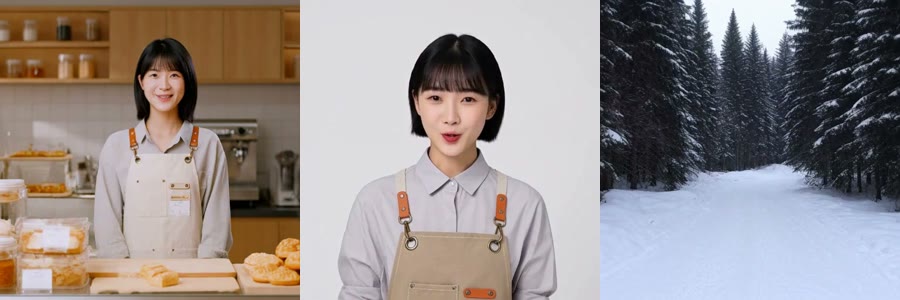
Sometimes the result still started in the bakery; sometimes the whole video was the solid background from the character image, and the pine forest wasn’t used at all.
Later I added one sentence: take only the character from the character image, and don’t include the background. With the same four combinations, two of them failed without this sentence; with it, all four were correct.
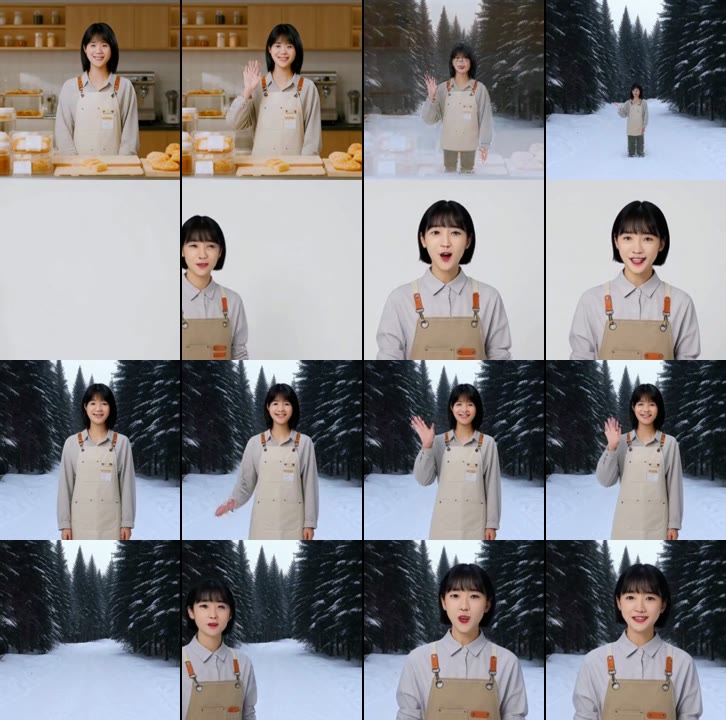
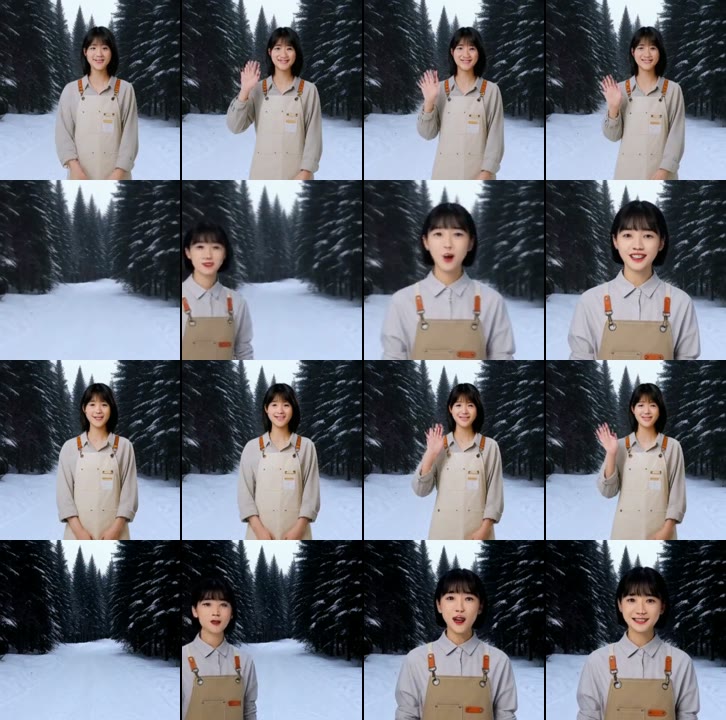
The motion was the same. “Slowly walk into the forest, introduce the environment” — I tested it 6 times and never got both the visuals and dialogue right. I changed it to “walk in from the left, stop, introduce this place” — all 4 were correct.
You also need to state clearly what each image is. In this set of tests, specific English nouns plus a trait worked reliably; Chinese definitions and vague “person”, “place” didn’t work well.
These tests used the same material and two seeds, with only a few tries for each phrasing, so don’t treat the success rates here as a guarantee. If you want to try it yourself, use a clean background for the character image where possible, and don’t put eye-catching people or animals in the scene image; generate a draft first to see how it looks.
My own WebUI is now open source
I packaged it as a service: the web UI, the command line, and chats in WeChat and Feishu (a Chinese workplace chat app) all share one task queue.
In the web UI, you enter the description and dialogue, choose the aspect ratio and quality, and submit. For each reference image, you enter its purpose, what it is, and its features, and the program assembles the format. If there’s a scene image, it automatically adds the line above “for other images, take only the subject, not the background”.
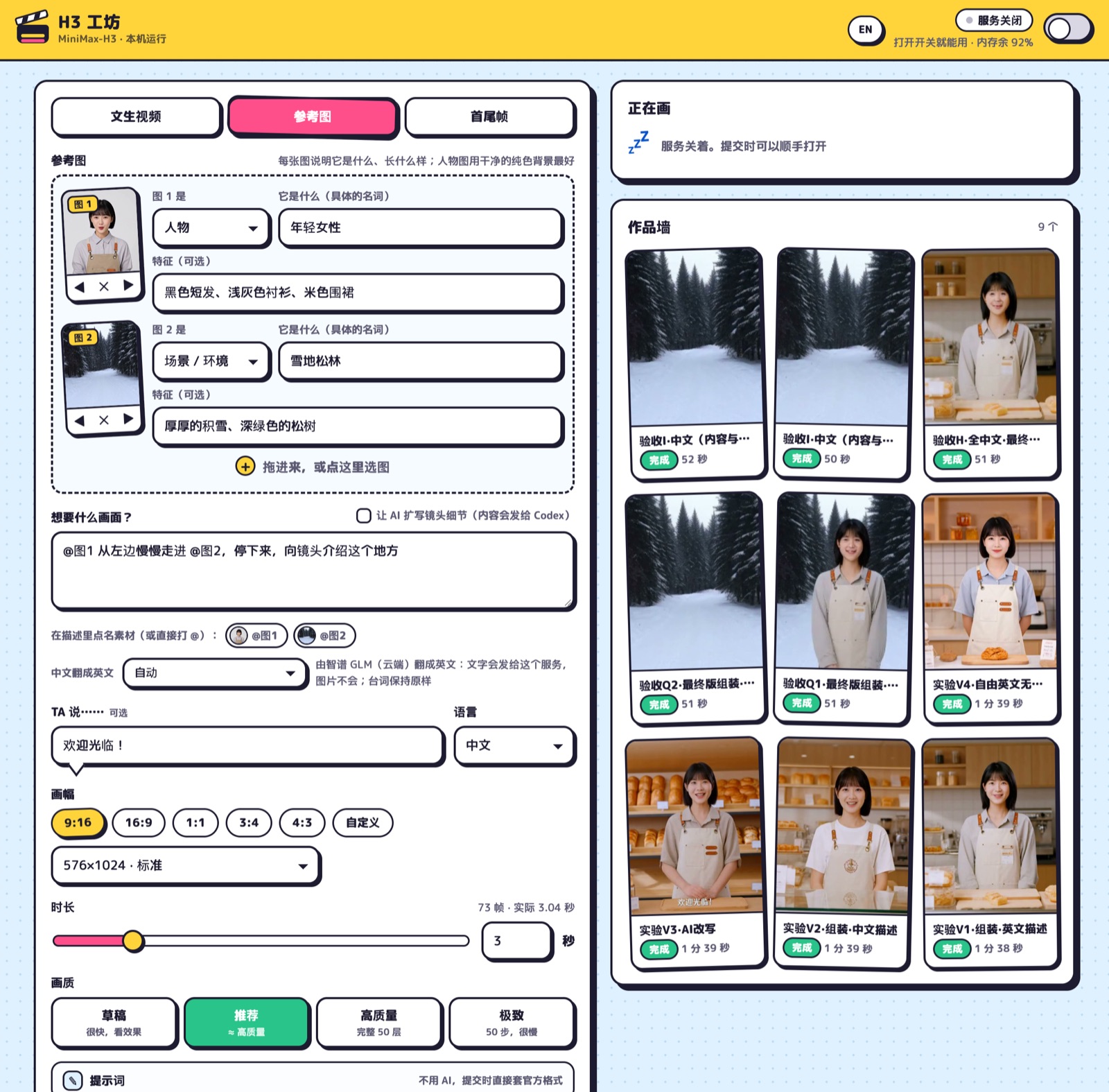
Now, in a chat, I can say “the girl in the image waves and says welcome, 3 seconds”, attach the image, and get the video when generation finishes. The service shuts down automatically after an hour of inactivity.
I cleaned up the web UI and queue and open-sourced them as h3-studio (stars welcome):
https://github.com/shisaq/h3-studio
Translation, AI expansion and chat push are all optional plugins. Video generation runs locally; if you choose cloud translation or Codex expansion, the relevant text and images will still be sent out. If you want everything local, choose local translation and leave expansion off.
For now I’ll keep using it for 2–5-second short shots, to make illustrations move, or to test an idea first. Long videos mean a long wait, and the dialogue isn’t reliable enough to skip checking.
If you haven’t bought a Mac mini yet, you can look at these results and think about what you’ll use it for: whether you’ll mainly generate two- or three-second clips or often produce long videos, and whether you’ll run only H3 or also run other models and services. The former is already workable for me; for the latter, you need to allow for more waiting time and leave more resource headroom.
I tested this on an M5 Pro 64GB, and the speeds here can’t be applied directly to other chips or memory configurations. What this article offers is this machine’s actual output, its resource usage, and its timings. When buying, besides memory, don’t overlook the disk: model downloads aren’t small, and generated videos will keep taking up space too.
Summary
A local model is certainly not as capable as a cloud model, and MiniMax is of course no exception — it can’t compare with a model like Jimeng (ByteDance’s AI image and video generator). And to run a local model, a base-spec Mac mini certainly isn’t enough either. But it has 2 advantages: 1) you never have to worry about credits or token usage again; 2) strong privacy.
This post is just me sharing what I tested; I hope it’s useful as a reference. Feel free to comment and discuss below.
-
Previous
Logic Pro Smart Tempo: Matching Non-Standard Recorded Material -
Next
Mac mini Runs a 27B Model at Up to 35 token/s